

Guest register and Form C, ready when you need them
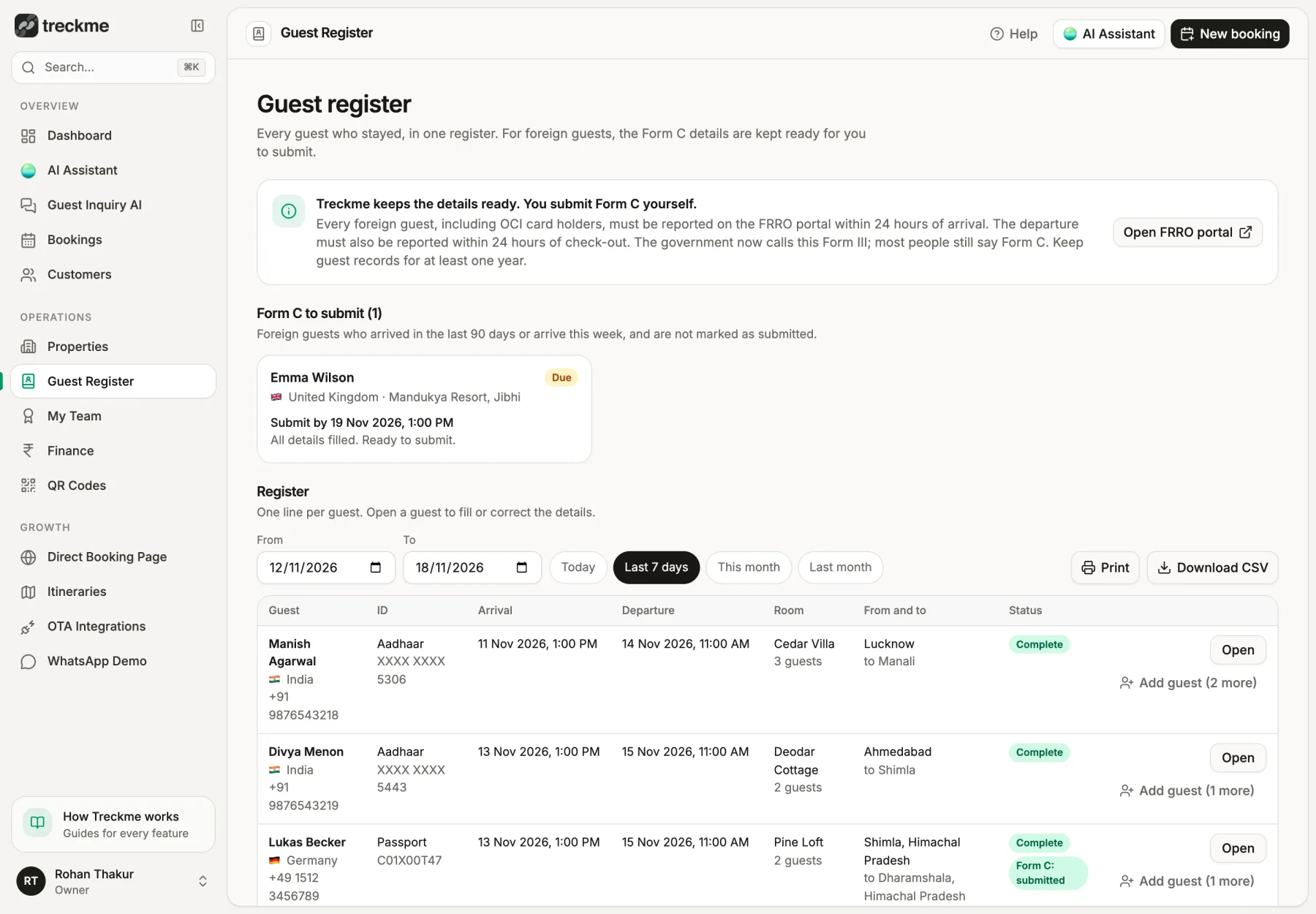
Every guest who stays is added to your register. For foreign guests, Treckme gets the Form C details ready from the passport collected at check-in, so you can submit them to the FRRO quickly.
Compliance
Guest Register and Form C for Hotels and Homestays in India
Keep a digital guest register and get Form C details ready for foreign guests. Treckme fills them from the ID collected at check-in and shows what is still pending.
See it in Treckme
Screens show a demo property. Guest names, phone numbers and amounts are sample data.
The paperwork every property has to do
Properties in India keep a register of the guests who stay, and the police can ask to see it. When a foreign guest stays, the property also has to report the arrival to the FRRO using Form C, within 24 hours. Small teams often do this by hand, late at night, from a photo of the passport.
- A paper register is easy to lose and hard to search
- Form C has many fields and a short deadline
- Missing it can lead to trouble with the authorities
A register that fills itself
When a guest checks in through Treckme, their details go into your guest register: name, ID, phone, room, and arrival and departure time. You do not type anything twice. Open the register for any dates and any property.
- One row for each guest for each stay
- Filter by property and date
- Download it or print it when someone asks for it
Form C details for foreign guests
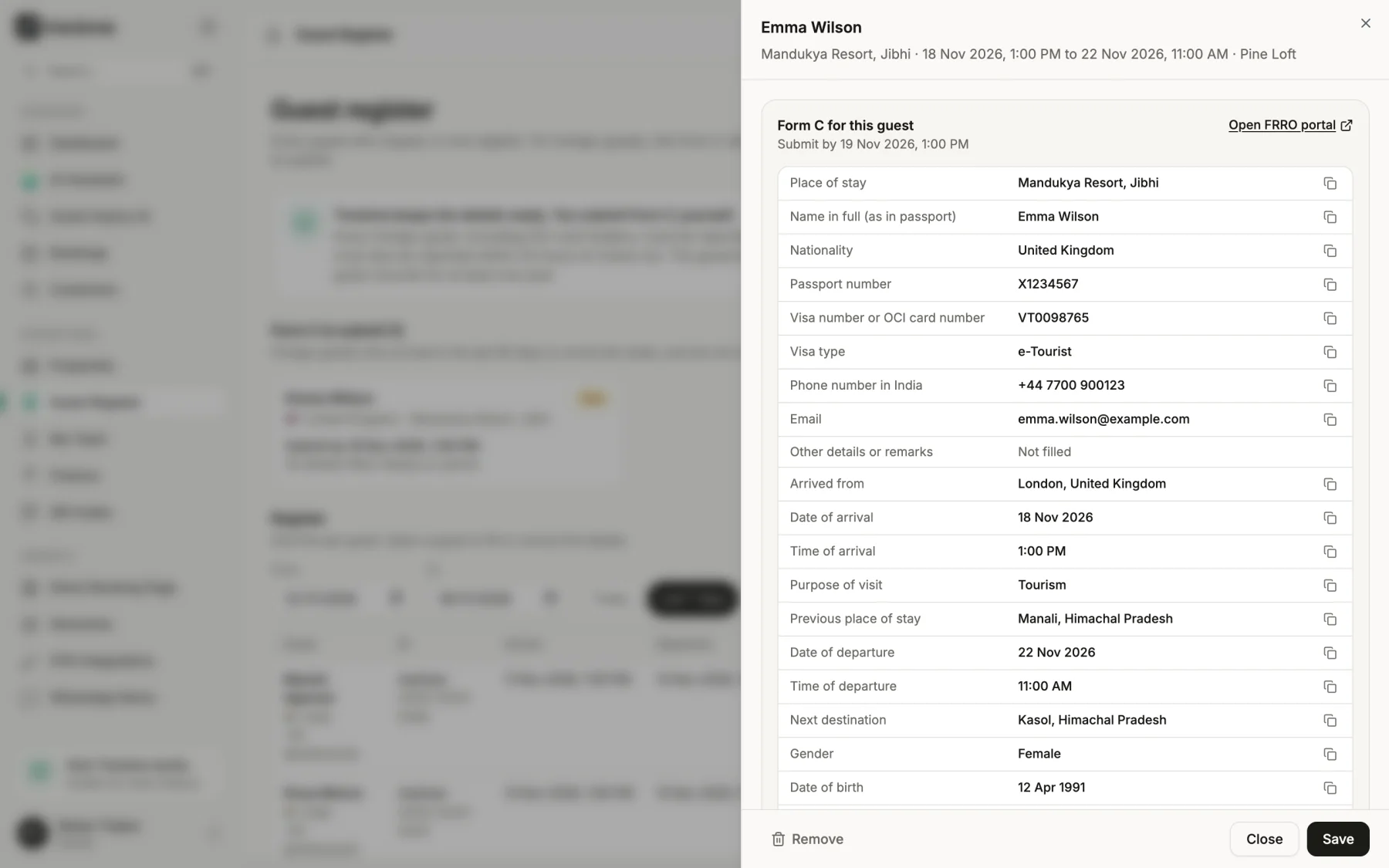
For a guest who is not an Indian national, Treckme shows the Form C details in one place: passport, visa, arrival in India and stay details. It fills what it already knows from check-in and marks what is still missing.
- See which foreign guests still need Form C, and by when
- Missing fields are clearly marked
- Save the FRRO reference number after you submit
AI reads the passport, you check it
Treckme can read the passport or visa photo the guest uploaded and fill the empty boxes for you. It is a suggestion. You check each detail before you save, because the details you submit must be correct.
- Saves typing from a small photo
- Nothing is saved until you confirm
- You can always type the details yourself
Guests fill their details before they arrive
With online check-in, the guest uploads their ID from their phone before arrival. Indian guests only upload the front and back of their ID. Guests with a foreign phone number get a short form for the extra details Form C needs.
- No extra steps for Indian guests
- Foreign guests give passport and visa details once
- Less work at the front desk on arrival
What Treckme does and does not do
Treckme prepares the details. You submit Form C yourself on the official FRRO portal, where you copy the details from Treckme. The portal also asks for the guest photo, which you upload there. Rules can change, so please check the FRRO website for the latest requirement.
- Treckme does not submit to the FRRO for you
- Copy the details with one tap
- Only your account can see guest ID details
Frequently asked questions
What is Form C?
Form C is the report a hotel, homestay or any place of stay in India sends to the FRRO when a foreign guest arrives. It is submitted online on the FRRO portal.
Does Treckme submit Form C to the FRRO?
No. Treckme gets the details ready and shows what is missing. You submit them on the official FRRO portal with your own login.
Do Indian guests need Form C?
No. Form C is for guests who are not Indian nationals. Indian guests are only added to your guest register.
Can I download the guest register?
Yes. Choose the property and dates, then download or print the register.
Is the passport data safe?
Guest ID details can only be seen by your own account. They are not shown on any public page.
Does it cost extra?
No. The guest register and Form C details are included in every Treckme plan.